
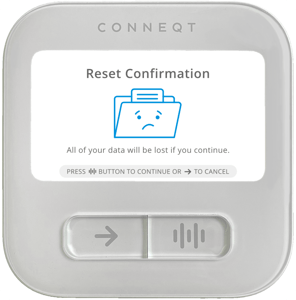
Performing a factory reset is neccesary when you change phones, or your current phone loses its secure bluetooth connection with your Pulse. The reset will allow your Pulse to enter pairing mode, which will allow it to be able to pair with your phone again.
Important:
- Factory resetting the Pulse will not remove any data which was previously synced to the CONNEQT App.
- All data that was not synced before resetting Pulse will be lost permanently.
To factory reset Pulse, perform the following steps:
Forget the device from Bluetooth:
- On your phone, go to Settings > Bluetooth.
- Find "CONNEQT Pulse" and tap "Forget" or "Remove."
Remove Pulse from the CONNEQT app:
- Open the CONNEQT app.
- Go to Settings > Devices and remove/unpair the Pulse if listed.
Reset the Pulse device:
- Turn the Pulse on.
- Press and hold both buttons simultaneously until you see the reset confirmation (about 15–20 seconds).
- Release both buttons, then confirm by pressing the right Pulse button.
Re-pair through the app:
- Wait about 30 seconds before turning it back on.
- Open the CONNEQT app and follow "Add Device" steps to pair.
Need Help?
If you have any trouble, our support team is here for you:
- Live Chat: Visit our website at www.conneqthealth.com and use the live chat feature for real-time assistance.
- Email: hello@conneqthealth.com
- Phone (US): +1 234-CONNEQT (+1 234-266-6378).
Our support team is available during business hours: Monday–Friday: 9:00 AM to 5:00 PM (central time).